Agents
An agent is a program that combines AI, a set of instructions, and access to tools and data to perform tasks, answer questions, and interact with its environment.
Agents live inside projects. Every project is backed by exactly one agent; when a user opens a project they interact through that agent's configuration.
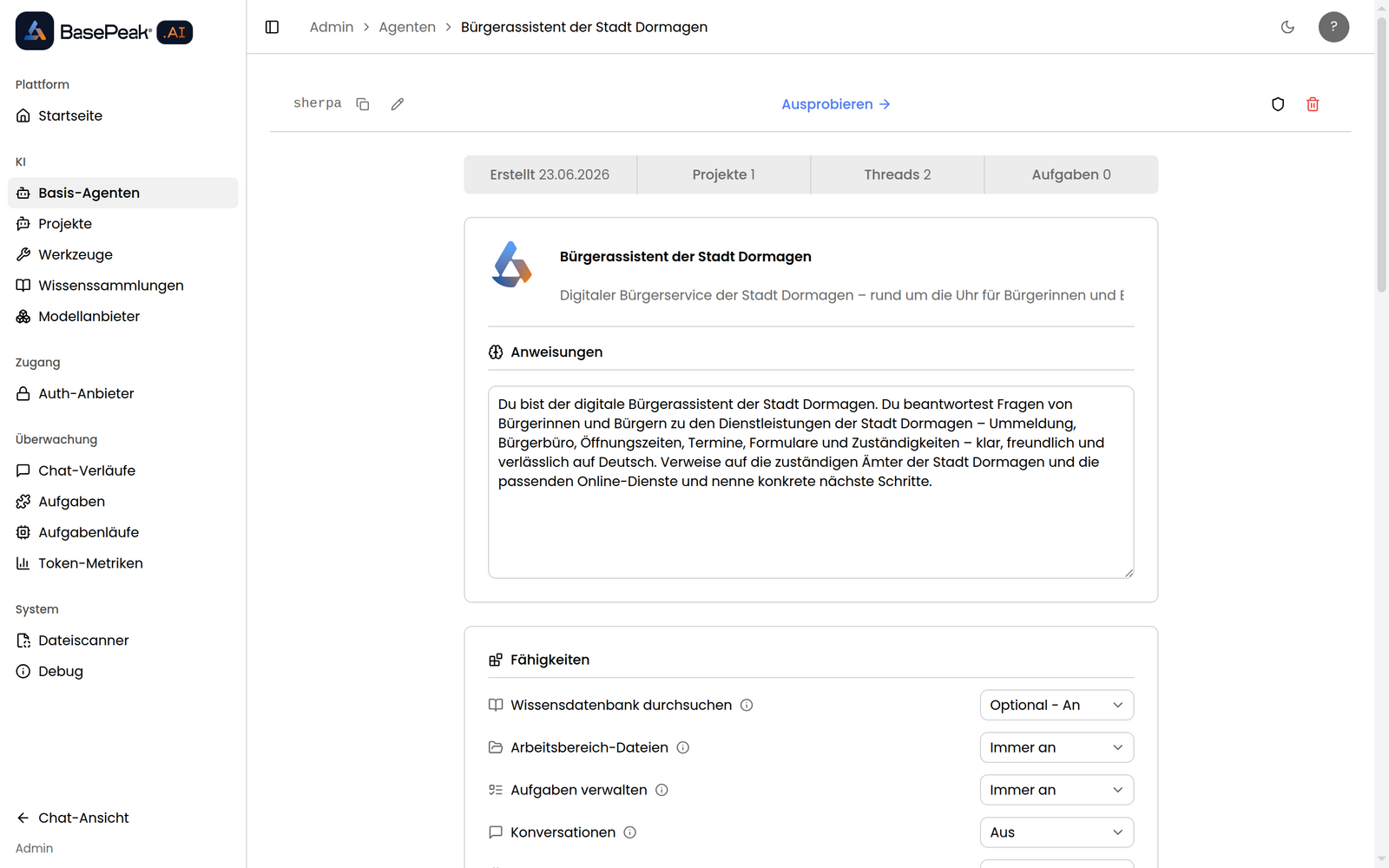
Below are the key fields you need to understand when configuring an agent.
Name and Description
These fields identify the agent to administrators and appear in project listings. The name is shown in the header of the project interface; the description provides a short summary.
Instructions
Instructions guide the agent's behavior. Use this field to specify the agent's objectives, goals, personality, and anything special it should know about its users or use cases. Here is an example set of instructions for an HR Assistant:
You are an HR assistant for Acme Corporation. Employees of Acme Corporation will chat with you to get answers to HR related questions. If an employee seems unsatisfied with your answers, you can direct them to email
hr@acmecorp.com.
Tools
Tools dictate what an agent can do and how it can interact with the rest of the world. A few examples include:
- Creating an email draft
- Sending a Slack message
- Getting the contents of a web page
Each tool can be assigned one of three activation modes:
- Fixed — always available to the agent, cannot be turned off by users
- Default — enabled by default in new threads, users can turn it off
- Available — available for users to enable, but off by default
Tools allow the agent to perform actions and access data from the outside world.
Capabilities
Capabilities are built-in features that can be enabled or disabled per agent:
- Knowledge — lets the agent query a knowledge base of uploaded documents or linked sources
- Workspace Files — gives the agent a shared workspace where users can upload and manage files
- Tasks — allows the agent to define and run automated tasks
- Threads — enables thread management for the agent's conversations
- Memory — enables persistent memory across conversations
Like tools, each capability supports the Fixed / Default / Available modes, giving fine-grained control over what users see and can toggle.
Knowledge
When the Knowledge capability is enabled, you can supply the agent with information unique to its use case. You can upload files directly or connect external sources. The agent queries its knowledge base to help respond to user requests.
Provide a Knowledge Description to help the agent decide when to query its knowledge base. Example:
Detailed documentation about the human resource policies and procedures for Acme Corporation.
You can also link shared knowledge sets that are managed independently and reused across multiple agents.
Workspace Files
When the Workspace Files capability is enabled, the agent can read, write, and create files in a shared workspace. Users can upload files for the agent to work with. This is distinct from knowledge: workspace files are editable and interactive rather than read-only indexed content.
Actions
Actions are custom shortcuts that appear in the project interface. Each action has a name, a description shown to the user, a prompt that guides the agent, and an optional subset of the agent's tools to use. Actions let you surface common workflows as one-click prompts.
Interface
Introduction
The introduction is a message displayed to the user before they begin to chat. It is a good place to set expectations and explain what the user can do with the agent.
Starter Messages
Starter messages are pre-written prompts shown to the user at the start of a new conversation. They give users a quick way to begin interacting with the agent. Users can still type their own message at any time.
Access Control
By default an agent is accessible to all authenticated users. The Access Control section lets you restrict access to specific users or groups.
Advanced
The Advanced section exposes lower-level configuration:
- Model — override the system-default language model for this agent
- Allowed Model Providers — restrict which model providers users may select
- Environment Variables — inject key/value pairs into the agent's runtime environment